martes, 7 de abril de 2020

MIND MAP. CREATELY.


The tool I have chosen to create the mind map is Creately. This resource is really easy to use and practical. When you start creating your mind map, the first thing you see is a white page with squares. In the left side, there are some facilities to add pictures and create figures and lines.  I like this tool because is simpler for students to use and you can add any kind of picture.

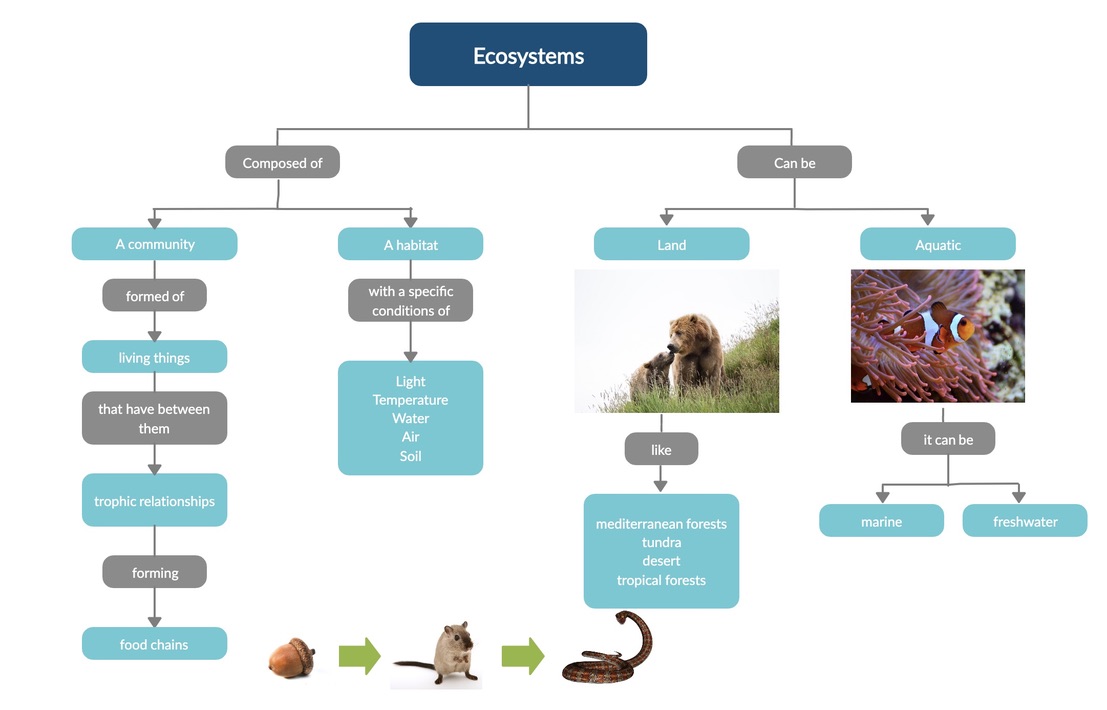
The mind map attached below is about ecosystems. This mind map can be used at the end of a lesson to review all the contents that they have learnt. Also, you can make an activity, leaving some spaces in blank and then students must fill de gaps. At the same time, students seeing this visual map while reviewing everything might help them to structure all the new contents.

All the images are taken from Pixabay.


domingo, 15 de marzo de 2020

GENIAL.LY

I have used Genial.ly to create a presentation where I can explain in an interactive way a lot of different contents. This time, I have chosen the topic of biomes. I have decided to do this content because, in my view, students prefer to see the diversity of biomes in a visual way. In order for students to understand this topic clearly, I rather show them the different biomes with a presentation.

In the presentation embedded below, you can see the first slide with the title and the earth. If you press on the earth you will go to the next slide. In the second slide, there is a map of the world with all the biomes. Each black sign has information and a video about each biome.


Creative Commons Licence
This work is licensed under a Creative Commons Attribution 4.0 International License.


Here I leave you a video with the structure of my project.


miércoles, 4 de marzo de 2020

PINTEREST

Hello everyone!
In this session I have chosen a content curation tool called Pinterest. I have created a new account and I have chosen five different topics that can be useful for my teaching and my students:

  • Music: Activities using music are always useful to make a learning more interesting and fun for students. 
  • Manual Arts: Many students learn better with manual activities.
  • CLIL activties: We will be able to innovate in the CLIL activities.
  • Activities for children: We will find different activities to use with children about a lot of different topics.
  • TIC Education: Looking for innovative and technologic resources.


jueves, 27 de febrero de 2020

LEVES OF ORGANIZATION


I have chosen this picture to explain the levels of organization in the subject of Natural Science in CLIL. During the explanation, students will have this picture in the interactive whiteboard. This image will help them to organise their minds and to understand the different concepts better. 


http://eschooltoday.com/ecosystems/levels-of-organisation-in-an-ecosystem.html


The use of images in Natural Science will make it easier for students to understand any kind of content. Images are a wonderful resource for any kind of subject. 


lunes, 24 de febrero de 2020

MY AVATAR


Hello everyone! 👋🏻

This is my new avatar. 

  • She is Anne.
  • She is 23 years old.
  • She is a professional dancer.
  • She loves graphic design and reading.

BITMOJI

Bitmoji is a practical app. It has many helpful features. It's not only available on the mobile phone but also on the computer. I have really liked this new app that I have discovered today.

This app is really useful for his application in a classroom. Each student can make his own avatar in a simple and fast way. At the same time, kids will have fun and have a great time, because is something different from what they are used to.


SUMMARY OF THE SUBJECT

HELLO EVERYONE TO MY BLOG!  Today I bring you a summary of all the new tools I have learnt through these months in the subject ...